

What no. series are used when processing progress payment invoices? #
On the Progress Payment Setup page, you can assign a unique No. Series specifically for progress payments. If you leave these fields blank, the app will automatically use the default No. Series defined in the Sales & Receivables Setup or Purchase & Payables Setup pages, depending on the transaction type.
What do I do if a progress invoice is incorrect? #
You can create Progress Payment Cr. Memos from the original order. The steps are like posting a Progress Payment Invoice. Once you create the Progress Payment Cr. Memo, apply that document against the original Progress Payment Invoice. You can either credit a partial amount of the original Progress Payment Invoice or the whole amount and redo the Progress Payment Invoice.
I made a progress payment invoice for too much, what should i do? #
If you posted too much with a Progress Payment Invoice, you should post a Progress Payment Cr. Memo by clicking on Posting>>Progress Payment>>Post Progress Payment Cr. Memo. You is prompted to enter an amount to credit (the steps are like creating a Progress Payment Invoice), you can either enter the amount to bring the total Progress Payment amount to the correct amount or enter the full amount of the incorrect Progress Payment amount. Either of these choices will be shown in the Progress Payment Documents list and will reduce the Remaining Progress Amount.
Can I post several progress payment invoices for an order? #
Yes, you can post as many Progress Payment Invoices as you need as long as you do not go over the Order total amount.
Do I need to apply payments against the progress payment invoices? #
Only if you mark the Check Prog. Pmt. When Posting field on Progress Payment Setup page to true.
Do I have to post my shipment or receipt before i post a progress payment invoice? #
No! You are able to post Progress Payment Invoices at any point during you’re A/R and A/P process.
I get a missing no. series setting error when I try posting a progress payment, what do I do? #
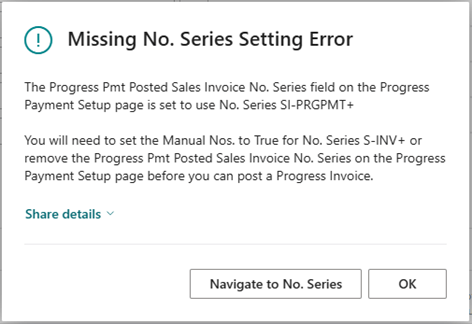
When you get this error, click on the Navigate to No. Series button and set the Manual Nos. field to True.

Next, go back to the order and run the Post Progress Payment Invoice (or Cr. Memo) process again.
But why did I get the missing no. series setting error? #
You have assigned a No. Series to the Posted Progress Payment document No. Series fields in the Progress Payment Setup page. To allow you to use different No. Series than what is assigned as the Default No. Series for Posted Invoices and Posted Cr. Memos, Business Central requires that you mark the default No. Series as allowing Manual Nos.


