

This app will only calculate the sales tax for the state of California. The sales tax calculation will be based on the Ship-to Address for the following documents:
- Sales Quotes
- Sales Orders
- Sales Blanket Orders
- Sales Invoices
For the following documents, the sales tax will be calculated using the Return-From Address:
- Return Orders
- Credit Memos
In addition:
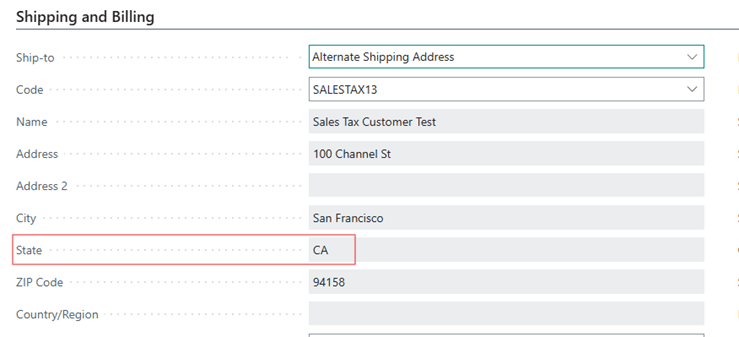
- The Ship-to County (or Return-From County) must be set to CA for the sales tax calculation to trigger
- If the Ship-to (or Return-from) Longitude or Latitude is used, it will override the use of address, city, and zip code.
- Verify any address if the Address Confidence is anything less than HIGH
Sales Tax Calculation by Address #
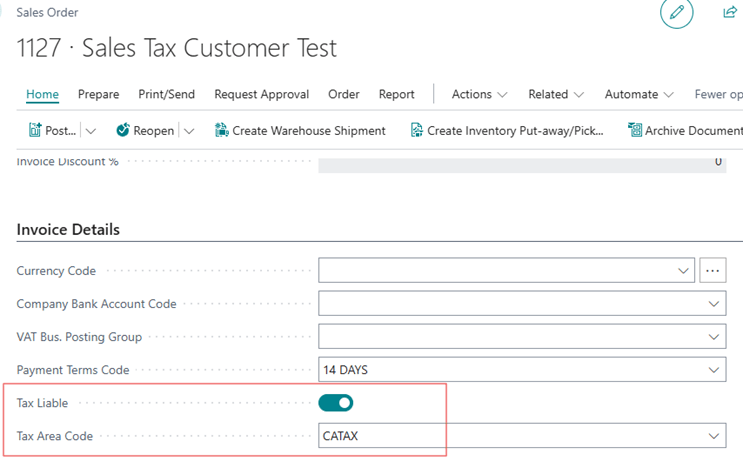
- Ensure the sales document is Tax Liable and the Tax Area Code is set to CATAX
- Ensure the Ship-to State is set to CA
- The order will go to the CDTFA website to retrieve the most current published sales tax rate when the document is Released, or the document Statistics page is opened.
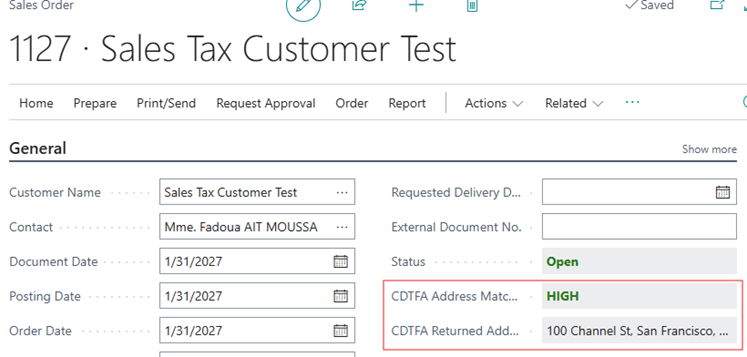
- The CDTFA site will return a CDTFA Address Match Confidence and the CDTFA Returned Address in the General group. Verify that what is returned is what you expect and correct if necessary.
Sales Tax Calculation by Coordinates #
The app is not bound to a street address for calculating the sales tax, alternatively you are able to enter GPS coordinates to determine the tax rate.
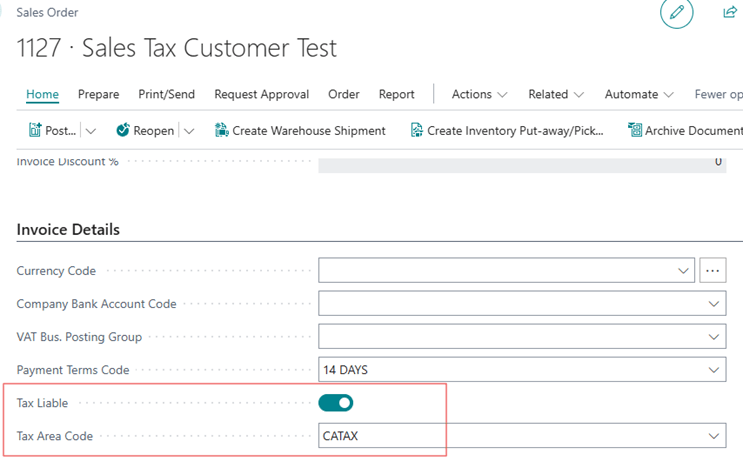
- Create the sales document is Tax Liable and the Tax Area Code is set to CATAX
- Ensure the Ship-to State is set to CA
- Fill in the Ship-toAddress Longitude and Ship-to Address Latitude.
- Be aware: Entering these fields will bypass the Ship-to Address information
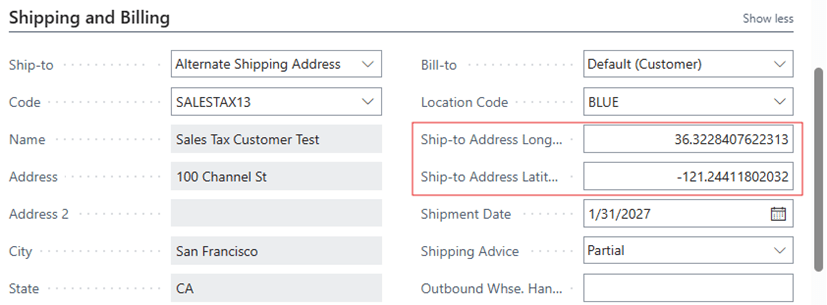
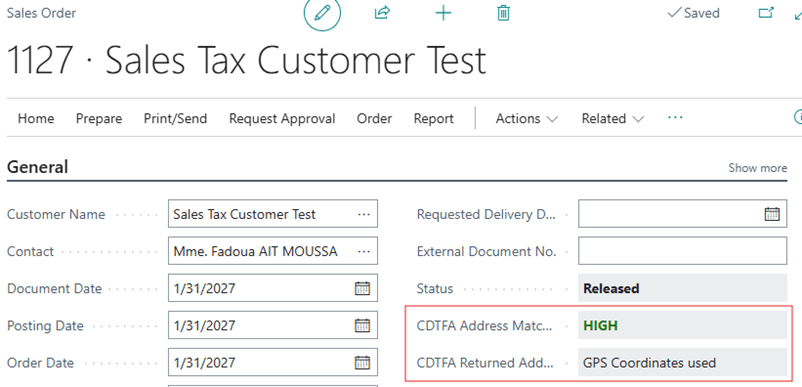
- When you Release the document or go to the Statistics, the order will go to the CDTFA website to retrieve the most current published sales tax rate based on the coordinates entered.
- The CDTFA site will return a CDTFA Address Match Confidence in the General group, but the CDTFA Returned Address willstate ‘GPS Coordinates used’. Verify that what is returned is what you expect and correct if necessary.
Using Location Code Address for Ship‑to (Will Call / Pickup Orders) #
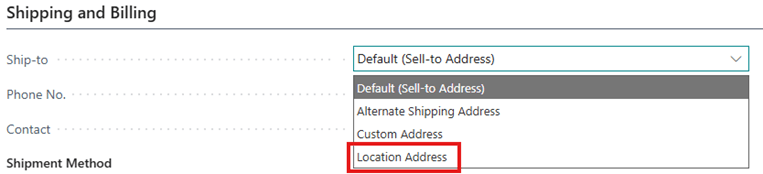
Since the applicable tax rate must reflect where the customer takes possession of the goods, to support Will Call and Pick up orders, the app includes a feature that allows the Ship‑to Address to be set based on the Location Code assigned to the Sales document. Simply change the Ship-to option to Location Address and the system automatically sets the Ship‑to Address to match the Location Code address.
This approach ensures accurate, destination‑based tax calculation for Will Call orders and maintains compliance with California sales tax rules without requiring manual address updates.
Setting Up Location Address on a Sales Order or Invoice
- Open a Sales Order or Sales Invoice
- Select the Location Code you want to ship to
- In the Ship-to Options field, select “Location Address”
Exporting Schedule A #
Before you begin, download the latest Schedule A form from the CDTFA website. This is required to be used for the Schedule A export. You can download the latest version of a blank Schedule A here:
https://cdtfa.ca.gov/cros/schedule-a.htm
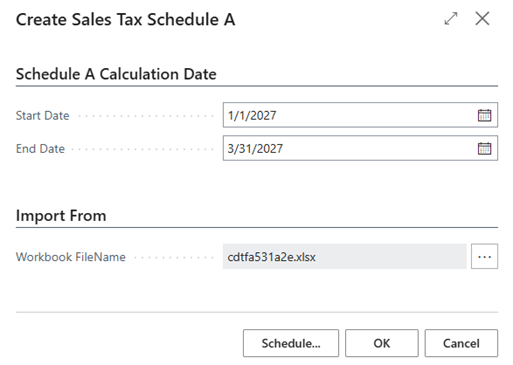
- Open the Create Sales Tax Schedule A report
- Define the Start Date and the End Date for the data to be exported
- Click on the Assist Edit button on the Workbook File Name and choose the Schedule A template file that you downloaded
- Click OK
Uploading Schedule A for Sales Tax Reporting #
- Open the Schedule A exported in the previous step
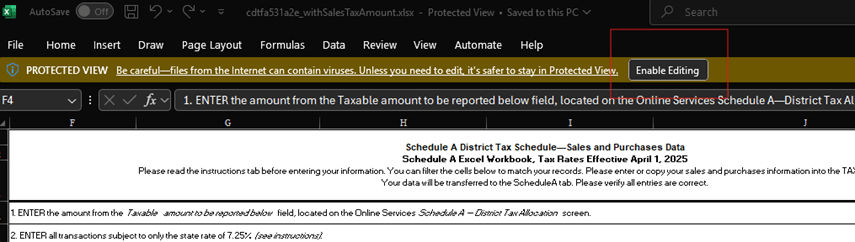
- Open the file and click on Enable Editing
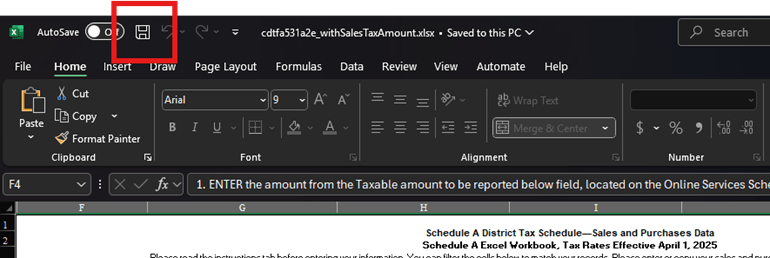
- IMPORTANT: Click on Save
- Here are the instructions to upload the exported Schedule A when you’re filing your sales tax return:
https://www.youtube.com/watch?v=UmGdmZ0Y9k0
NOTE: It’s important that you click on Save in step number 3. Otherwise, the file will not upload.
CDTFA Errors #
- Call to web service failed – This error means that Business Central could not access the web service.
- Check if the Allow HttpClient Request is enabled in the Extension Management app is enabled
- Check if there are any security blocks in your network environment
- The CDTFA website may be offline temporarily
- No tax rate info returned for the given address – This error means that the address being sent to CDTFA is incorrect. Check if the Ship-to Address or the Return-From Address is valid
- A tax rate could not be found at the geocoded location – This error means that the coordinates used for sales tax calculation is invalid. Check your Longitude and Latitude and try again
- The address could not be geocoded – The Ship-to address cannot be found in the CDTFA website. Verify the address and try again
Limitations #
- You will not be able to use the Get Shipment Lines functionality because the sales tax can only be calculated from sales header. Since the Get Shipment Lines functionality grabs different sales lines from multiple orders, the sales tax for those shipped orders may be calculated incorrectly.
- The sales tax calculation only works on the sales side. It’s assumed that the purchase use tax (or sales tax) calculation is specific to your location. In these instances, you can use the regular sales tax setup to calculate the use or sales tax for your locations.
- When you’re issuing credit memos, you can only base the sales tax being credited to the customer from a single location per credit memo.


