

Permission Sets #
- APCCNTRADMINE
- Assign this to the users that are considered administrators of the app setup.
- A license is required for this permission.
- APCCNTRUSERE
- Assign this to the users that will be setting up, updating, and processing container records.
- A license is required for this permission.
- APCCNTRREADE
- Assign this to all users that will not be updating or processing containers but may need to view pages that contain Container information, such as Purchase Orders, Items, or Item Ledger Entries.
- These users do not need to be assigned a license.
- APCCNTRTESTUSERE
- A special license is available to be used to allow one account to test this app in a Sandbox.
- This permission set is only for use in a Sandbox environment and cannot be assigned to any user in a Production environment.
Freight Container Receiving Management Setup #
- Number Series Group
- Container Nos.
- Specifies the No. Series to use for the Containers.
- Posted Container Nos.
- Specifies the No. Series to use for the Posted Containers.
- Container Nos.
- Container Defaults Group
- Default Inbound Transit Leadtime
- Specifies the default date formula to calculate the Estimated Receipt Date based on the Vessel Arrival Date.
- Default Transfer Order In-transit Location
- Specifies the default In-Transit Location Code to use to transfer inventory to the final location.
- Default On the Water/Air Location
- Specifies the default On the Water/Air Location Code to use when receiving items from overseas. Leave it blank if you do not use OTW locations.
- Default Planning Flexibility
- Specifies Planning Flexibility on Transfer Order Lines to prevent Planning processes from recommending action against the transfer line when running MRP.
- Options:
- Default: This will use the Planning Flexibility assigned on the Purchase Order
- None: This will set the Planning Flexibility on Transfer Order Lines to None
- SplitPurchase Line
- Specifies whether to split source purchase lines into multiple lines when the container is received.
- Default Inbound Transit Leadtime
On the Water Location Setup #
This location must have the On the Water Location field set to true on the Location Card.
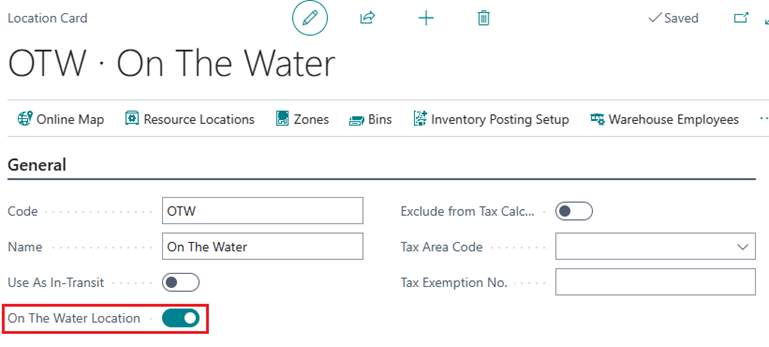
- Additionally, the On the Water Location cannot have the following fields set to true:
- Require Pick
- Require Put-away
- Require Receive
- Require Shipment
- Use as In-Transit


