Skip to content
  • English English
    • English English
APC Dynamics | Dynamics 365 Business Central ConsultantAPC Dynamics | Dynamics 365 Business Central Consultant
  • Home
  • Our Company
    • Our Partners
    • Careers
  • ERP Solutions
    • Dynamics 365 Business Central
    • Dynamics 365 Business Central Add-ons
    • Dynamics NAV
  • Our Services
  • Portfolio
    • Food Manufacturers
    • Nurseries and Farms
    • High-Tech Equipment Manufacturing
    • Sporting Goods / Active Sports
    • Automotive Aftermarket
    • Distribution/Wholesale
  • Articles
  • Support
    • Knowledge Base
    • Contact Us

Freight Container Management

  • Overview and Setup
  • User Guide
  • Reports
  • Appendix
  • FAQ

Progress Payment Invoicing

  • Overview and Setup
  • User Guide
  • FAQ

Installment Payment Terms

  • Overview and Setup
  • User Guide

Purchase Request Module

  • Overview and Setup
  • User Guide

California Sales Tax

  • Overview and Setup
  • User Guide

Sales Commission Based on Cash Receipt

  • Overview and Setup
  • User Guide
  • Appendix

Item Restriction

  • Overview and Setup
  • User Guide
  • FAQ

Serial Number by Bin on Bin Contents

  • Overview and Setup
  • User Guide

Inventory Aging Report

  • Setup and User Guide

Daily Invoicing Report with G/L Breakdown

  • Setup and User Guide

How-tos

  • Purchase and License an app through Microsoft AppSource
  • Setup New Users in Business Central
View Categories
  • Knowledge Base
  • Serial Number by Bin on Bin Contents
  • User Guide

User Guide

< 1 min read

The Serial No by Bin on Bin Contents app allows Warehouse Users to see the serial numbers that are in a bin on the Bin Contents page for Items with SN Warehouse Tracking .

Show serial numbers on Bin Contents page #

After installation, users can select an item on the Bin Contents page and look at the serial numbers that are within the bins.
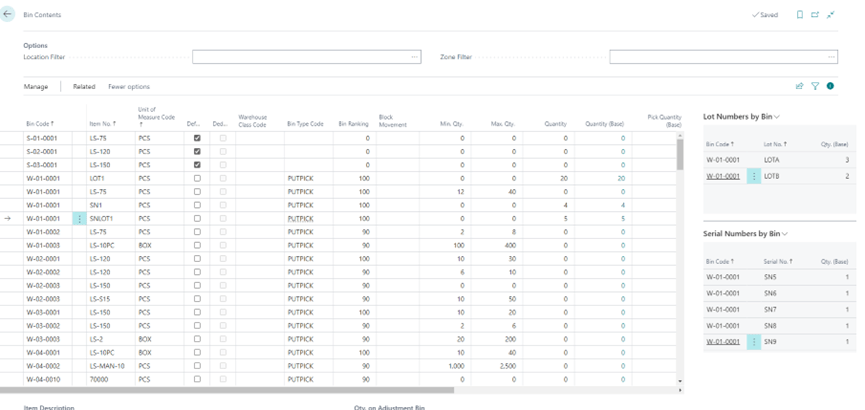
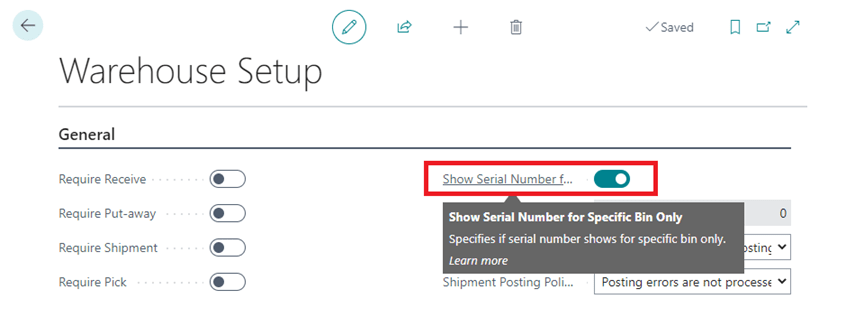
Standard Business Central will display all of the serial numbers within a bin in the Serial Numbers by Bin factbox. If you only want to see the serial numbers within a specific bin, go to the Warehouse Setup, and enable Show Serial Number for Specific Bin Only.
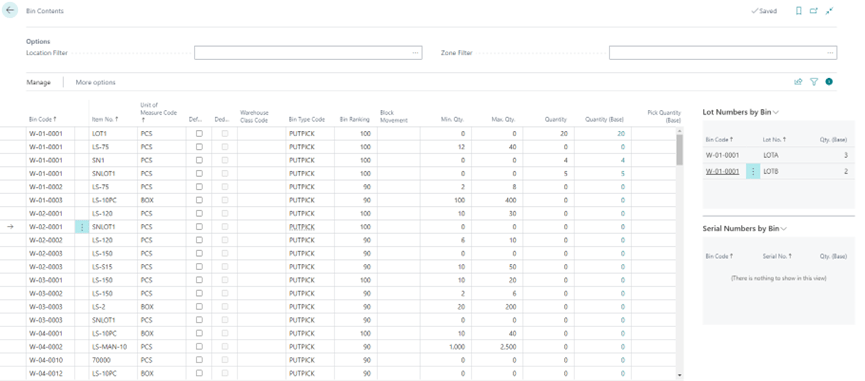
The Serial Numbers by Bin factbox only shows serial number for the selected bin code if the option Show Serial Number for Specific Bin Only is enabled.
Share This Document:

  • Facebook
  • X
  • LinkedIn
Overview and SetupOverview and Setup
Table of Contents
  • Show serial numbers on Bin Contents page

Copyright © 2025 APC Dynamics Inc.

Privacy Notice | Privacy Requests

This site is protected by reCAPTCHA and the Google Privacy Policy and Terms of Service apply.

Copyright 2026 © AP Commerce, Inc.
  • Home
  • Our Company
    • Our Partners
    • Careers
  • ERP Solutions
    • Dynamics 365 Business Central
    • Dynamics 365 Business Central Add-ons
    • Dynamics NAV
  • Our Services
  • Portfolio
    • Food Manufacturers
    • Nurseries and Farms
    • High-Tech Equipment Manufacturing
    • Sporting Goods / Active Sports
    • Automotive Aftermarket
    • Distribution/Wholesale
  • Articles
  • Support
    • Knowledge Base
    • Contact Us
  • English English
    • English English