

The Item Restriction app gives you complete control over which items can be sold to specific customers, and which items can be purchased from specific vendors—helping ensure compliance, maintain quality standards, and enforce business rules directly within Business Central.
Here’s what makes it different:
- Customer-Specific Sales Restrictions – Define and enforce rules that prevent certain customers from purchasing restricted items.
- Vendor-Specific Purchase Restrictions – Block the purchase of specific items from designated vendors to maintain supplier control and quality assurance.
- Geographic Region Restrictions – Restrict item sales to certain regions to comply with regulations or business policies.
- Rule Tracking and Management – Keep a clear record of all active and historical restriction rules for easy auditing and reference.
- Effective Date Control – Set start and end dates for restrictions to manage temporary limitations or seasonal product availability.
Installation & Setup #
This app is licensed through Microsoft. To purchase and deploy it in your production environment, follow the instructions in the link below:
How to purchase and license the app through Microsoft AppSource
Assign User Permission Set #
- Open the Users list.
- For each necessary user, add the permission sets based on the role for the app:
- APEITEMRESTRICTION
- This permission is needed only for users that will be creating item restriction rules and any user that will be creating, updating, or processing Sales or Purchase Documents. A license is required for this permission.
- APEITEMRESTUSER
- This permission is needed for non-Admin users of the app. Users that will be creating, updating, or processing Sales or Purchase Documents. A license is not required for this permission.
- APEITEMRESTRREAD
- Any user that may need to review but not update Sales or Purchase Documents.
- These users do not need to be assigned a license.
- APEITEMRESTRICTION

Item Restriction Setup #
On the Item Restrictions Setup page, define the setup that you wish to use:
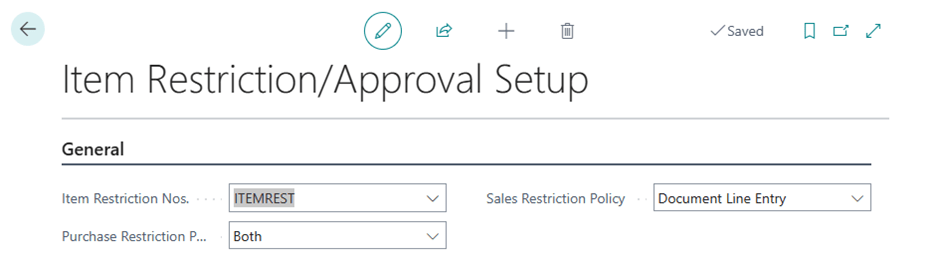
- Item Restriction Nos. – This is the number series that will be used to create the item restriction records.
- You will need to either select an existing No. Series, or define a new No. Series for the Item Restriction Nos.
- Sales Restriction Policy and Purchase Restriction Policy – This determines where you want to check the item restrictions using the below possible values:
- Release – The restrictions are checked at the time of release
- Document Line Entry – The restrictions are checked at the time of entry
- Both – The restrictions are checked both during entry and on release


