Skip to content
  • English
    • English
APC Dynamics | Dynamics 365 Business Central ConsultantAPC Dynamics | Dynamics 365 Business Central Consultant
  • Home
  • Our Company
    • Our Partners
    • Careers
  • ERP Solutions
    • Dynamics 365 Business Central
    • Dynamics 365 Business Central Add-ons
    • Dynamics NAV
  • Our Services
  • Portfolio
    • Food Manufacturers
    • Nurseries and Farms
    • High-Tech Equipment Manufacturing
    • Sporting Goods / Active Sports
    • Automotive Aftermarket
    • Distribution/Wholesale
  • Articles
  • Support
    • Knowledge Base
    • Contact Us

Freight Container Management

  • Overview and Setup
  • User Guide
  • Reports
  • Appendix
  • FAQ

Progress Payment Invoicing

  • Overview and Setup
  • User Guide
  • FAQ

Installment Payment Terms

  • Overview and Setup
  • User Guide

Purchase Request Module

  • Overview and Setup
  • User Guide

California Sales Tax

  • Overview and Setup
  • User Guide

Sales Commission Based on Cash Receipt

  • Overview and Setup
  • User Guide
  • Appendix

Item Restriction

  • Overview and Setup
  • User Guide
  • FAQ

Serial Number by Bin on Bin Contents

  • Overview and Setup
  • User Guide

Inventory Aging Report

  • Setup and User Guide

Daily Invoicing Report with G/L Breakdown

  • Setup and User Guide

QuickAttach

  • Overview and Setup
  • User Guide
  • Supported Objects

Sharepoint Connector

  • Setup and User Guide

Disassembly Order Management

  • Overview and Setup
  • User Guide
  • FAQ

How-tos

  • Purchase and License an app through Microsoft AppSource
  • Setup New Users in Business Central
View Categories
  • Knowledge Base
  • QuickAttach
  • Overview and Setup

Overview and Setup

1 min read

The QuickAttach app extends Microsoft Dynamics 365 Business Central by providing a modern, high-performance file management interface. It eliminates the multi-step upload process of standard Business Central, allowing you to manage documents with simple drag-and-drop actions and seamless SharePoint integration.

Here’s what makes it different:

  • True Drag & Drop Interface – Instantly attach files by dragging them from your desktop directly onto any record FactBox.
  • Enterprise SharePoint Integration – Automatically offload files to SharePoint to keep your Business Central database lean and your documents organized in a structured folder hierarchy.
  • Automated Document Flow – Ensure continuity by having attachments automatically carry over from unposted orders to posted invoices during the posting process.

Installation & Setup #

This app is licensed through Microsoft. To purchase and deploy it in your production environment, follow the instructions in the link below:
How to purchase and license the app through Microsoft AppSource

SharePoint Connector #

QuickAttach requires the SharePoint Connector to be set up in order to connect Business Central to SharePoint, follow the instructions in the link below:

SharePoint Connector setup and user guide

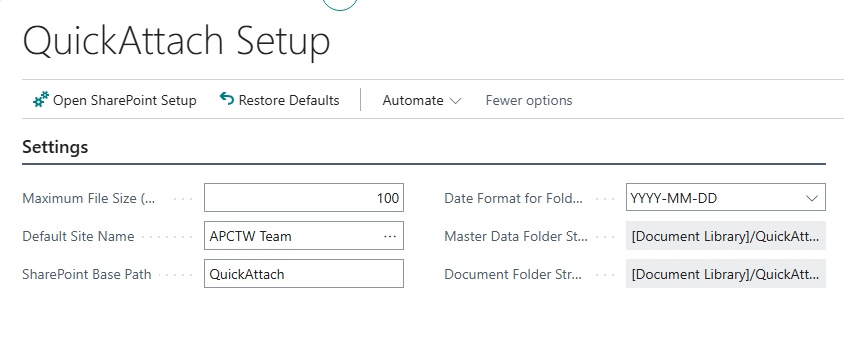
QuickAttach Setup Page #

Note: Please ensure Sharepoint Connector App is setup.

  1. Search for QuickAttach Setup and select the related link.
  2. On the Settings tab, you can change the settings.
Assign User Permission Set #

Note: Users will need to be assigned Sharepoint Permission Sets.

  1. Search “Users” and select the related link.
  2. Select the User Card for the relevant staff members.
  3. Under User Permission Sets, add the following based on the user’s role:
    • APEQUICKATTADMIN: Full access to setup and management.
    • APEQUICKATTUSER: Allows users to drag, drop, and view attachments on records.

Share This Document:

  • Facebook
  • X
  • LinkedIn
Supported ObjectsUser Guide
Table of Contents
  • Installation & Setup
  • SharePoint Connector
  • QuickAttach Setup Page
  • Assign User Permission Set

Copyright © 2025 APC Dynamics Inc.

Privacy Notice | Privacy Requests

This site is protected by reCAPTCHA and the Google Privacy Policy and Terms of Service apply.

Copyright 2026 © AP Commerce, Inc.
  • Home
  • Our Company
    • Our Partners
    • Careers
  • ERP Solutions
    • Dynamics 365 Business Central
    • Dynamics 365 Business Central Add-ons
    • Dynamics NAV
  • Our Services
  • Portfolio
    • Food Manufacturers
    • Nurseries and Farms
    • High-Tech Equipment Manufacturing
    • Sporting Goods / Active Sports
    • Automotive Aftermarket
    • Distribution/Wholesale
  • Articles
  • Support
    • Knowledge Base
    • Contact Us
  • English English
    • English English