
Overview
If you import goods, you already know the most frustrating part of container management isn’t receiving the inventory. It’s waiting for it.
One of the biggest frustrations I hear from salespeople and production managers isn’t about posting receipts or matching invoices like the accounting staff. It’s much earlier than that. It’s the simple question of, “Where are the items right now?”
For years, this information has lived outside of Dynamics 365 Business Central. It’s buried in emails, spreadsheets, or screenshots from freight forwarders. By the time the data makes its way back, it’s already stale. When things go wrong, such as delays, port strikes, etc., you’re really lost in the dark.
That gap in visibility is exactly what we set out to close with the latest update for our Freight Container Receiving Management app.
Know Where Your Inbound Items are in Business Central
You’re now able to track freight containers that holds your cargo in real time while they’re on the ocean and even on the rail. This is powered by an integration with Terminal49 (terminal49.com), which tracks the vessels your containers are on into a single source.
This means the your container status no longer lives outside the system. It’s available directly inside Business Central. You can see when a container departs, when it arrives, when it’s been discharged, and when it moves inland by rail. No more guessing. No more chasing for updates
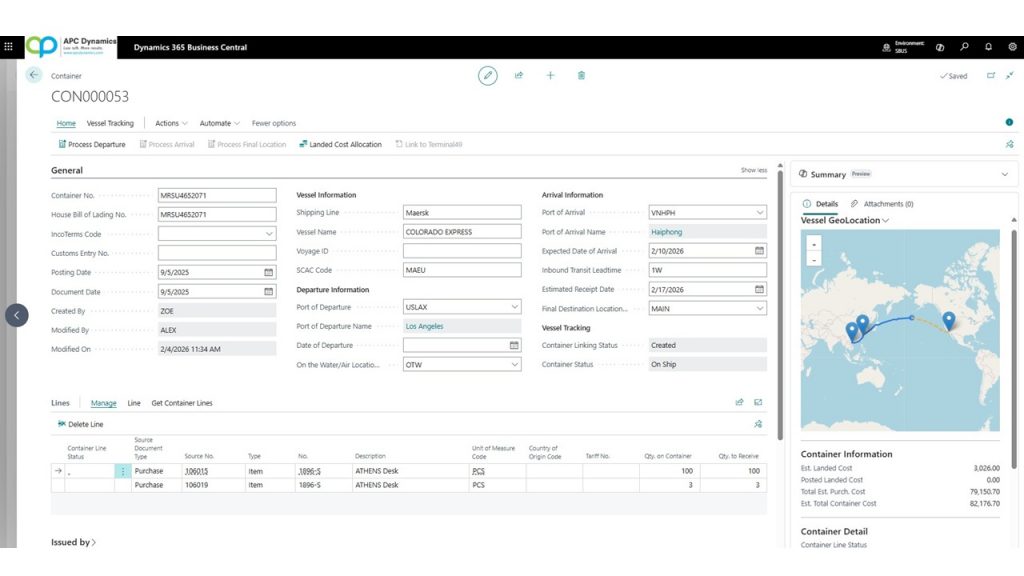
Take a look at the integration in action here:
Why This Matters
You need to know where your inventory is at all times. When a customer calls, you should be able to tell them exactly where their products are anywhere in the world. When a production manager plans the shop floor, they need clear visibility into when raw materials will arrive so jobs can be completed on time.
Without visibility, planning becomes reactive. Production gets delayed. Customer commitments become harder to manage. The data may exist, but it’s not where it needs to be. Instead of accessing information with a single click, your team is forced to chase it down and pulling valuable resources away from other departments to get what they need.
Conclusion
This new tracking capability is built directly within Freight Container Management app in Business Central. You’re still managing containers, contents, landed costs, and receipts the same way, but now with real-time location and status layered on top.
The goal of this app (and all of our other published apps) has always been the same: reduce spreadsheets, reduce workload, and reduce the number of systems your team has to juggle. Real-time container tracking is a natural extension of that philosophy.
As supply chains continue to get more complex, visibility isn’t a nice-to-have anymore. It’s a requirement. This belongs inside your ERP, not in someone’s inbox.

Pingback: What's New in Freight Container Receiving Management: Version 1.8.18.0 | Confessions of a Dynamics 365 Business Central Consultant