Skip to content
  • English English
    • English English
APC Dynamics | Dynamics 365 Business Central ConsultantAPC Dynamics | Dynamics 365 Business Central Consultant
  • Home
  • Our Company
    • Our Partners
    • Careers
  • ERP Solutions
    • Dynamics 365 Business Central
    • Dynamics 365 Business Central Add-ons
    • Dynamics NAV
  • Our Services
  • Portfolio
    • Food Manufacturers
    • Nurseries and Farms
    • High-Tech Equipment Manufacturing
    • Sporting Goods / Active Sports
    • Automotive Aftermarket
    • Distribution/Wholesale
  • Articles
  • Support
    • Knowledge Base
    • Contact Us

Freight Container Management

  • Overview and Setup
  • User Guide
  • Reports
  • Appendix
  • FAQ

Progress Payment Invoicing

  • Overview and Setup
  • User Guide
  • FAQ

Installment Payment Terms

  • Overview and Setup
  • User Guide

Purchase Request Module

  • Overview and Setup
  • User Guide

California Sales Tax

  • Overview and Setup
  • User Guide

Sales Commission Based on Cash Receipt

  • Overview and Setup
  • User Guide
  • Appendix

Item Restriction

  • Overview and Setup
  • User Guide
  • FAQ

Serial Number by Bin on Bin Contents

  • Overview and Setup
  • User Guide

Inventory Aging Report

  • Setup and User Guide

Daily Invoicing Report with G/L Breakdown

  • Setup and User Guide

How-tos

  • Purchase and License an app through Microsoft AppSource
  • Setup New Users in Business Central
View Categories
  • Knowledge Base
  • Installment Payment Terms
  • Overview and Setup

Overview and Setup

2 min read

The Installment Payment Terms app extends Microsoft Dynamics 365 Business Central by enabling you to break a single invoice total into multiple smaller payments over time. This will make it easier to manage customer payment schedules and improve cash flow flexibility.

Here’s what makes it different:

  • Create Customized Payment Plans. – Design tailored payment schedules with flexible intervals, amounts, and due dates to match customer agreements or internal policies.
  • Track Payments and Status. – Monitor all payments made toward an invoice and view the real-time status of each installment—ensuring accuracy and transparency at every stage.
  • Seamless Integration with Business Central. – Work effortlessly within standard Business Central functionality to record received payments, track overdue amounts, and apply any configured fees automatically without any changes to your existing A/R and A/P processes.

Installation & Setup #

This app is licensed through Microsoft. To purchase and deploy it in your production environment, follow the instructions in the link below:
How to purchase and license the app through Microsoft AppSource

Installment Payment Terms Setup Page #

  1. Open the Payment Terms page
  2. Click on Installment Payment Setup on the ribbon menu
  3. The Installment Payment Terms Setup page opens
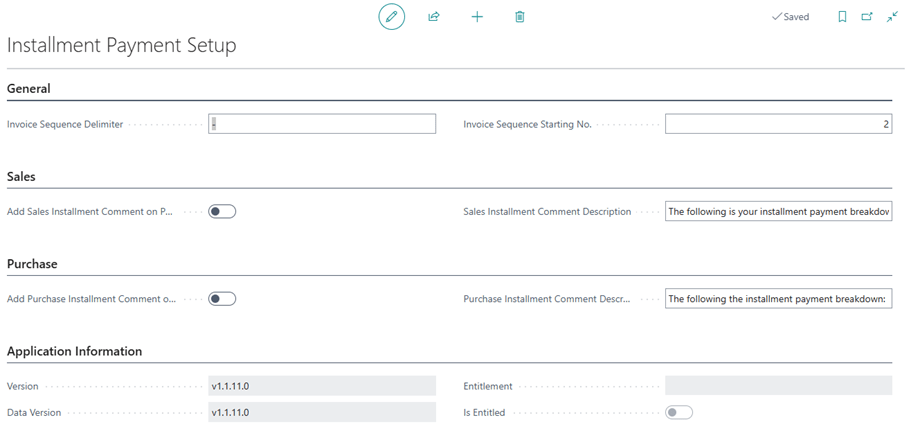
Installment Payment Setup page

Assign User Permission Set #

  1. Search “User” and select the related link to open the Users list.
  2. On the Users list, select users that will require permission to the Installment Payment Terms app.
  3. On each of the selected User Cards, go to the User Permission Sets tab, add the necessary permissions based on the role of the user:
    • APEINSTALLPMTADMINE
      • Use this permission set for administrators who manage Additional Installment Payment Terms. Users must have a license assigned in the Microsoft 365 admin center
      APEINSTALLPMTE
      • Use this permission set for users who can invoice Sales or Purchase documents. Users must have a license assigned in the Microsoft 365 admin center
      APEINSTALLPMTREADE
      • Use this permission set for users who cannot invoice Sales documents. A license is not required, but assigning this permission set prevents licensing errors when accessing areas used by the app.
    • APEINSTALLPMTDEMO
      • Use this permission set to test the app in a Sandbox environment. This permission set does not require a license. This permission set is not intended for use in Production
Available Permission Sets for the Installment Payment Terms App

Share This Document:

  • Facebook
  • X
  • LinkedIn
User GuideUser Guide
Table of Contents
  • Installation & Setup
  • Installment Payment Terms Setup Page
  • Assign User Permission Set

Copyright © 2025 APC Dynamics Inc.

Privacy Notice | Privacy Requests

This site is protected by reCAPTCHA and the Google Privacy Policy and Terms of Service apply.

Copyright 2026 © AP Commerce, Inc.
  • Home
  • Our Company
    • Our Partners
    • Careers
  • ERP Solutions
    • Dynamics 365 Business Central
    • Dynamics 365 Business Central Add-ons
    • Dynamics NAV
  • Our Services
  • Portfolio
    • Food Manufacturers
    • Nurseries and Farms
    • High-Tech Equipment Manufacturing
    • Sporting Goods / Active Sports
    • Automotive Aftermarket
    • Distribution/Wholesale
  • Articles
  • Support
    • Knowledge Base
    • Contact Us
  • English English
    • English English
