The out of the box Business Central has the Assembly Order function. This function allows you to assemble an item on the fly without going through the full manufacturing process. However, if you want to disassemble an item, you’re out of luck. This app will allow you to create a Disassembly Order and disassemble the items based on a disassembly BOM.
For example, if you’re selling a bicycle where the components of the bicycle can be sold individually, you can combine the components together at the time of shipping to be delivered to the customer as a kit. The problem comes when the customer decides to return the bicycle to you. For a company, you do not want to stock a bicycle on your shelf. It’s too big. The warehouse staff will need to disassemble the individual components to be picked and sold in the future.
To add to the complexity, there are some subcomponents that cannot be disassembled, so the assembled subassembly will need to be stored as inventory.
In addition, this app will allow you to automatically disassemble a finished good when it’s received from the vendor purchase order or the customer return order. This occurs when the returned good is already disassembled before it’s received.
Installation & Setup #
This app is licensed through Microsoft. To purchase and deploy it in your production environment, follow the instructions in the link below:
How to purchase and license the app through Microsoft AppSource
Assign User Permission Set #
- Click the search icon to enter “User” and click on the related link to open the Users list.
- On the Users list, select users that will require permission to the app.
- On each of the selected User Cards, go to the User Permission Sets tab, add the necessary permission sets based on the role of the user:
APEDISASSEMBLYMGMT – Assign this to the users that will be using this app in the production environment.
Setup #
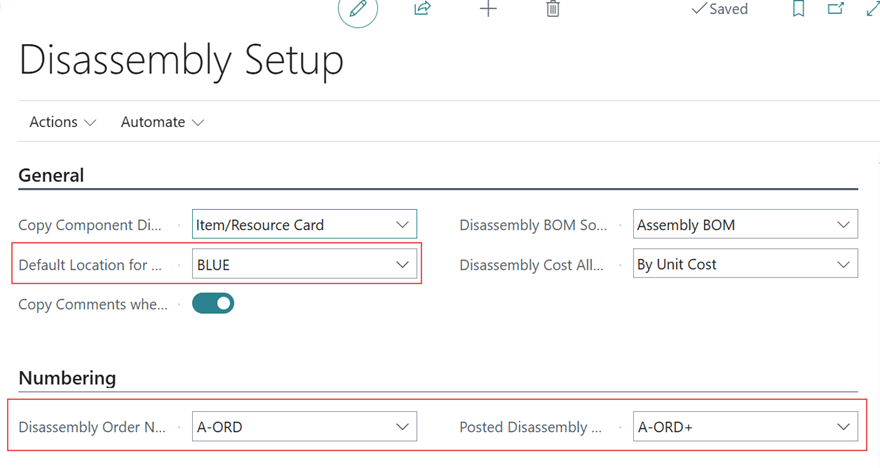
- Go to the Disassembly Setup using search
- Define the Default Location Code and the number series for the disassembly order and the posted disassembly order