
Overview
How much time do you actually spend receiving a container in Dynamics 365 Business Central?
The container isn’t what takes time. Managing everything around it is.
In Business Central, container receiving is not a single step. It’s a sequence of small tasks spread across multiple screens, including posting receipts against different purchase orders, tracking receipt numbers, creating transfer orders, and handling repeated posting for shipments and receipts. To keep everything under control, most teams rely on Excel as an unofficial control tower that tracks container details, document numbers, and lot information just to keep the process running.
The frustrating part is that most of this work exists simply to keep the process working. None of those activities make receiving faster or easier. They simply keep information organized and records aligned. What should be a straightforward receiving process becomes a collection of extra steps, workarounds, and administrative tasks.
A single container can easily take more than 120 minutes. And you know, most of it has nothing to do with receiving. Multiply that process across every container you receive each month, and it’s easy to see where the day goes.
The Simple Fix
Now imagine removing all of it.
No spreadsheets, no cross-checking, just a streamlined process inside Business Central that cuts receiving time by 50–60%. How many hours would that give back to you every month?
That is exactly why we built the Freight Container Receiving Management app for Business Central – A Simpler Way To Receive Containers.
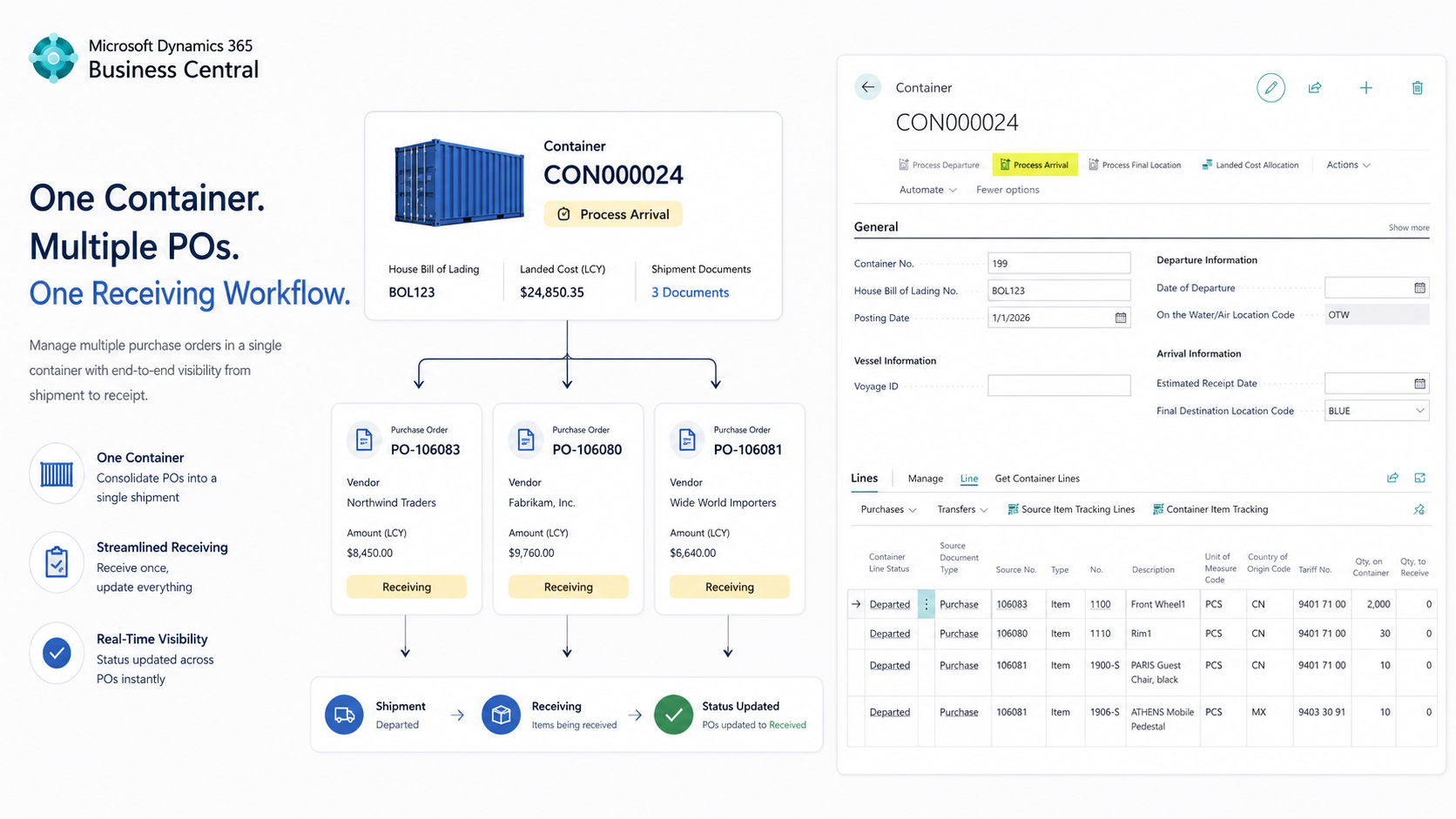
A Simpler Way to Receive Containers
- Receive by Container, Not PO
Instead of bouncing between multiple purchase orders to post receipts, receive directly from the container and keep all related documents connected automatically. One container. One receiving workflow. No need to process purchase orders one at a time. - Eliminate Transfer Order Administration
Creating transfer orders, matching purchase receipts, posting shipments, posting receipts, and tracking document relationships can consume hours of administrative work. The app automates the transfer process and eliminates much of the manual coordination required to move inventory through receiving. - Track the Container Without the Spreadsheet
Container status, vessel tracking, expected arrival dates, and receiving activity stay connected to the container record. No separate spreadsheet. No switching between systems. Everyone sees the same information in one place. - Simplify Landed Cost Allocation
Create and allocate item charges directly from the container record without jumping between multiple pages or manually rebuilding document relationships. Less administrative work. Fewer opportunities for mistakes. - Zero Document Hunting
Bills of Lading, freight invoices, and supporting documents stay attached to the container record so you don’t have to search through emails, folders, and spreadsheets to find the information behind a container. When questions come up, the information is already where it belongs.
Watch the full demo and see how it works inside Business Central:
Conclusion
What changes for the team?
- Fewer spreadsheet tracking and manual receiving errors
- Faster container receiving
- Better receiving visibility inside Business Central
Less time cleaning up receiving issues. More time moving inventory.
Learn more about our Freight Container Receiving Management app and see everything it can do for your receiving process.
